
Short answer: A cordless engraving pen should be chosen by the material, accessory and control needed for the first real project, not by the word pen alone. Cordlrotar's product page describes a rechargeable lithium rotary tool with a digital display, forward and reverse switching, and stated use for engraving, polishing and drilling DIY work. It does not call the body pen-shaped or publish dimensions, speed range, battery capacity, runtime, collet sizes or included engraving accessories. UK buyers should therefore verify grip, accessory fit and material suitability from the current instructions before ordering, especially where glass, metal or another brittle surface is involved.
Read past the word pen
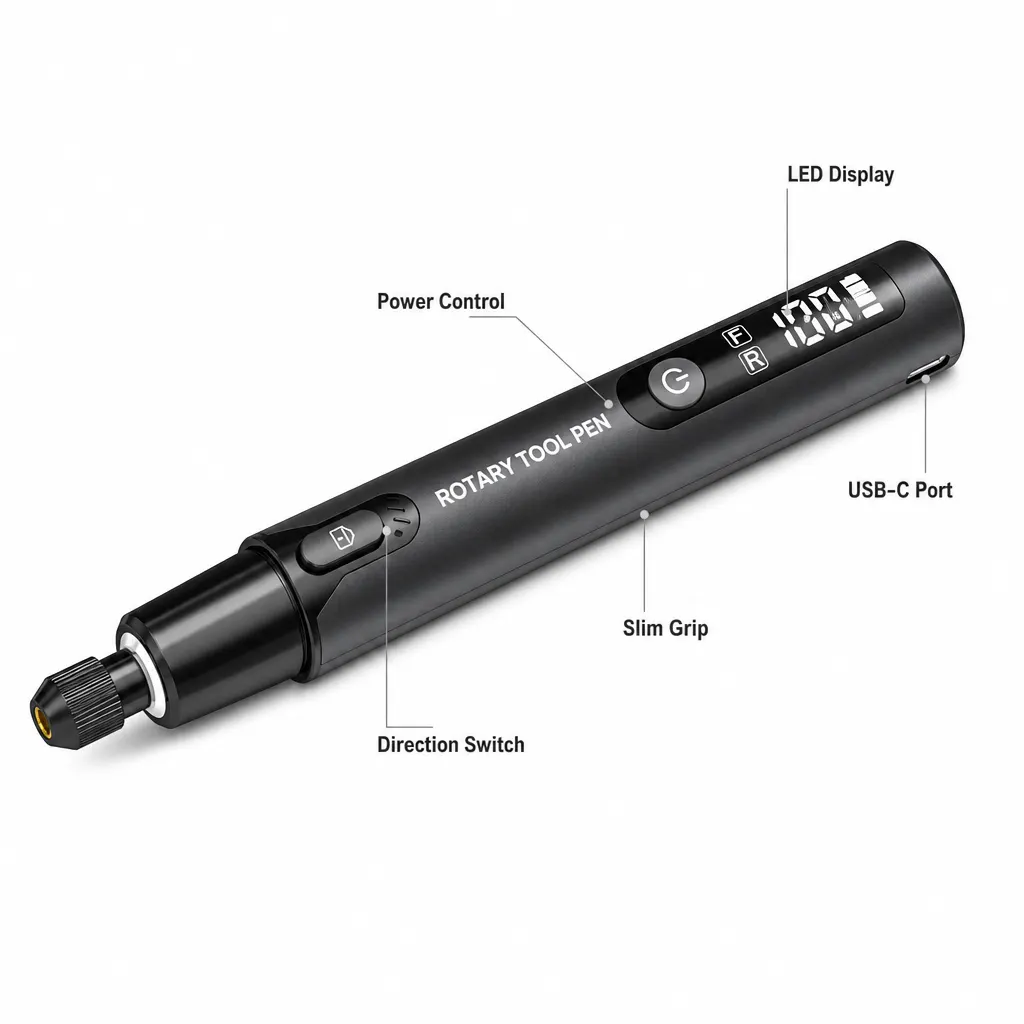
Searchers often use engraving pen for a compact handheld rotary tool, but the retailer's written description should control the buying decision. It confirms cordless rechargeable operation and engraving use without publishing the body's size, weight or grip shape.
If handwriting-style control is essential, ask for dimensions or handle the tool before relying on photographs. The manufacturer does not specify balance, vibration or suitability for users with limited grip strength.
| Question | Current page | What remains unknown |
|---|---|---|
| Is it cordless? | Rechargeable lithium rotary tool | Battery voltage, capacity and runtime |
| Can speed be monitored? | Digital display is listed | Speed range and number of settings |
| Can direction change? | Electronic forward and reverse are listed | How the control behaves under load |
| Is it pen-shaped? | Not stated | Dimensions, weight, balance and grip |
Match the first project to the stated tasks
The page names engraving, polishing and drilling DIY work. That gives three broad uses, but it does not identify the materials, bit types or maximum work size. Write down one first project and verify every needed accessory against the current manual or seller response.
- Name the material and whether the task is engraving, polishing or drilling.
- Identify the accessory type and shank size required for that material.
- Confirm the tool's chuck or collet accepts that accessory.
- Check the documented speed and handling instructions for the operation.
- Reject the purchase if a critical fit or material claim remains unconfirmed.
Treat the display as a control, not a specification
A digital display can help the user see the selected setting, but the product page does not publish what values it shows or how they relate to spindle speed. Do not infer precision, automatic load control or a particular number of speed stages.
Forward and reverse switching may be useful for handling direction, yet it does not establish that every accessory is intended to run both ways. Follow the accessory maker's instructions as well as the tool manual.
Limits and safety checks before buying
The manufacturer does not specify speed range, battery voltage, capacity, charging time, runtime, accessory inventory, chuck or collet sizes, material approvals, noise, vibration or certification on the written product page. Confirm any field that affects the intended job.
HSE says eye hazards can include dust and projectiles and that protective equipment must match the task and fit the user. Secure hair and loose clothing, keep the work supported, and follow the tool and accessory instructions rather than treating cordless operation as a safety guarantee.
Related guides and product details
Consider this cordless kit when its documented controls and verified accessory fit match your first project; do not buy on the engraving-pen label alone. Read Cordless Rotary Tool Buying Considerations for related guidance. Read Cordless Rotary Tool for Real-World DIY Use for related guidance. Review the documented specification on the Cordless rotary tool kit with digital display product page before ordering.
Sources and safety context
- Supports the cordless lithium tool, display, direction controls and three stated DIY tasks. Current Cordlrotar product page.
- Supports task-appropriate protection for eye, dust and projectile hazards. Using personal protective equipment to control risks at work.